
Starting May 2026, Google moved all Fitbit app users to Google Health and began enforcing a requirement to use a Google account to sync data from their Fitbit device. On October 30, 2026, Google will shut down the Fitbit API which MyDataHelps uses to collect data from Fitbit device users including through the Google Health mobile app in favor of a newly released Google Health API.
In order to continue collecting data from Fitbit device users in the new Google Health API, Google requires distinct user authorization through a new secure connection. This means all MyDataHelps projects & participants with Fitbit device connections must take action to continue gathering data from participants. If your project collects Fitbit data, this guide covers the steps needed to migrate to the new Google Health connection.
Sensor & EHR Settings
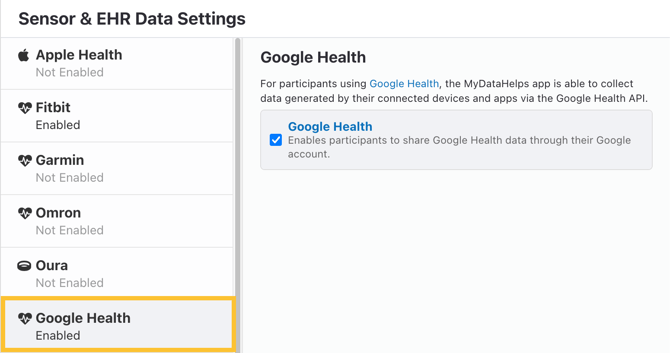
Google Health has been added as a new sensor data source in MyDataHelps, found in Sensor & EHR Settings. If your project was in Production Mode and not Paused on August 10, 2026, this has been automatically enabled in your project. For all other projects, you will need to enable this setting to start collecting data from Google Health.
Participant Re-Connection
Since Google Health is a distinct data data provider from Fitbit, Google requires all participants to specifically authorize MyDataHelps to collect data from the Google Health API. There are some automatic updates to app designer in place to support connection; however, you may wish to optionally nudge participants as well.
App Designer Updates
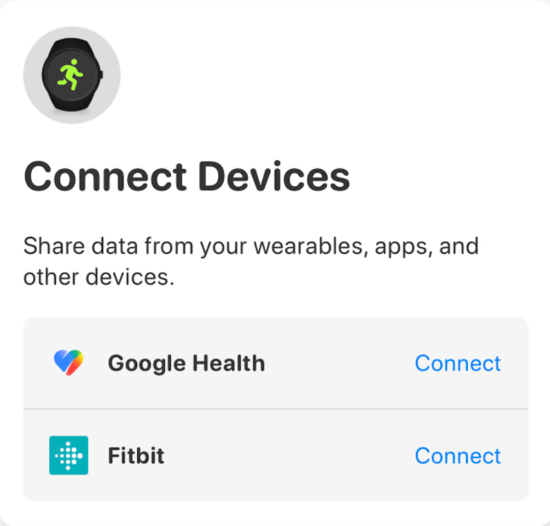
Any projects collecting Fitbit data and using the View Builder "Connect Devices Menu" or View Library views with device connections on that date will also have Google Health automatically enabled for connection, as shown:
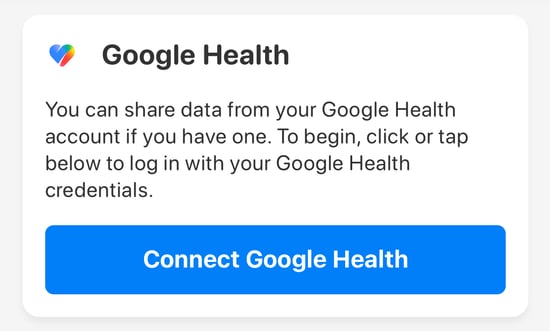
Additionally, the "Connect Fitbit" component will show "Connect Google Health" after a participant has connected their Fitbit account. Until the Fitbit API is shut down, it is recommended to have participants connect both Fitbit and Google Health in this sequence to prevent gaps in data.
Participant Notifications
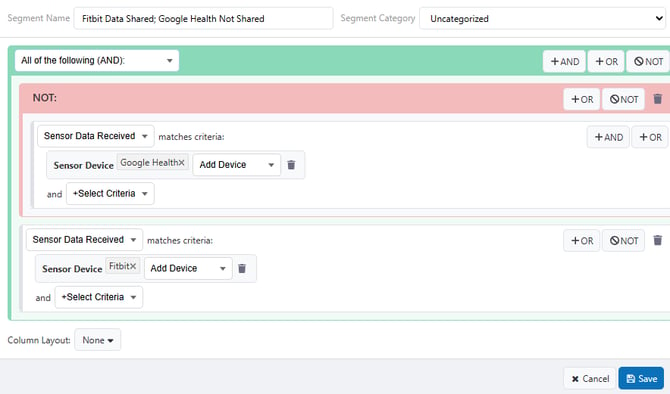
You may want to reach out to participants who have previously enabled Fitbit but have not yet enabled Google Health. For example, the following segment logic will filter for participants who have shared Fitbit data but have not yet shared any Google Health data.
Once you've published the notification you wish to send, you can create a Based on Participant Events schedule to nudge these participants at a set frequency until they've connected.
Schedules & Segments
Since Google Health is a distinct data connection, all logic actively used in Schedules and Segments using Fitbit will need to be updated to include Google Health as needed. Criteria such as Sensor Data Received now has a "Google Health" option. Similar to Fitbit, Google Health is added as a "Linked Account" with a category of "Device Manufacturer". You should review all segments and schedule logic and adjust or configure new ones as necessary depending on your project.
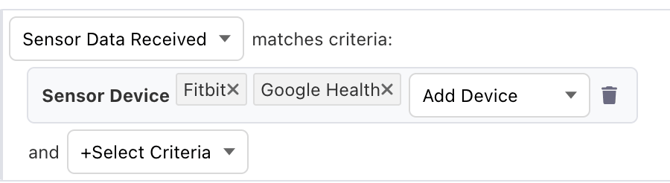
Consider updating any logic using the "Fitbit Device" criteria, as this only includes Fitbit and not Google Health connections.
Data Visualization
All projects using built-in visualizations, including "View Library" tabs such as the "Fitbit" and "Device Data" tabs as well as View Builder components, will seamlessly display data from Google Health with no required updates.
If your project uses custom hosted views which display or access Fitbit data, you will need to update your views to incorporate Google Health data since it is a distinct provider.
Intraday
The Google Health API will expose data with similar granularity to Intraday data for all users, without special access permissions. If your project collects Fitbit Intraday data, nothing additional is needed to continue to collect this fine-grained data through Google Health.
Data Exports
Fitbit exports will remain active until the Fitbit API is shut down by Google. You'll need to enable Google Health exports. Once enabled, your first Google Health export will contain all historical data from when participants first connect their account as described above.
API Integration
If you utilize Fitbit device data via the MyDataHelps REST API or SDK, you will need to migrate to utilize the Google Health namespace. Your migration path will depend on your current mechanism(s) for accessing Fitbit data:
| Current Mechanism | New Mechanism |
|---|---|
| Device Data V2 API/SDK | Use the new GoogleHealth namespace instead of Fitbit. You will also need to adjust your data types based on the available Google Health data types. |
| Device Data V1 API/SDK | Migrate to the V2 API with the GoogleHealth namespace. V1 is not supported for Google Health. |
| Fitbit API/SDK | Migrate to the Device Data V2 API. There are several -daily data types that will cover many use cases, or you can use the built-in aggregation methods of the V2 API. |
Data types in Google Health are named and structured differently. The table below highlights a few common Fitbit data types and their associated Google Health data types. Use the All Data Types endpoint for a complete list of available Google Health data types.
| fitbit data type | google Health data type |
|---|---|
activities-heart-intraday |
heartRate-list |
activities-steps-intraday |
steps-list |
activities-distance-intraday |
distance-list |
hrv-intraday |
heartRateVariability-list-rmssd and heartRateVariability-list-stddev |
sleep |
sleep-list-stages and sleep-list-out-of-bed |
Not all data types have a 1:1 correspondence between Fitbit and Google Health, and some have subtle differences in representation. For example, Google Health measures distance in millimeters and Fitbit in kilometers.
The Fitbit Device Data namespace and Fitbit-specific APIs will continue to operate for an indeterminate period of time, but will cease to function after the Fitbit API is shut down by Google. Historical Fitbit data will be available under the GoogleHealth namespace of the Device Data V2 API, within the data availability constraints of your project.
Frequently Asked Questions
Q: Didn't Google already change Fitbit to Google Health?
A: In May 2026, Google shut down the Fitbit mobile app and replaced it with the Google Health app. Fitbit users since this date were required to use a Google account to sync their data to their phone/Google Health app, but data was still sent to third parties like MyDataHelps using the existing Fitbit API. This action by Google ends that connection for a new Google Health API.
Q: Is Google Health the same as Google Health Connect?
A: No, Google Health is a mobile app available on both Android and iOS to collect data from Fitbit and other devices, and is distinct from Google Health Connect. Health Connect is built in to the Android operating system and allows users to connect health and fitness data from many sources including other mobile apps and their personal health records similar to Apple Health on iOS devices.